Backup in Virtuozzo containers, Virtuozzo hypervisor and Virtuozzo
Original Publishing Date:
2022-04-13
Summary
Server virtualization products use Virtual Automation (VA) for standard backup and restore operations.
Virtual Automation Agent (VA Agent) provides backup and restore tools and an API for the particular Hardware Node it is installed on.
Virtual Automation Management Node (VA MN) provides a centralized backup and restore API for all nodes registered in the VA group.
This article describes the backgrounds of the backup and restore processes, the server roles in the backup and restore processes, and common terms used in VA.
Server roles
Generally, there are three roles in a backup or restore process:
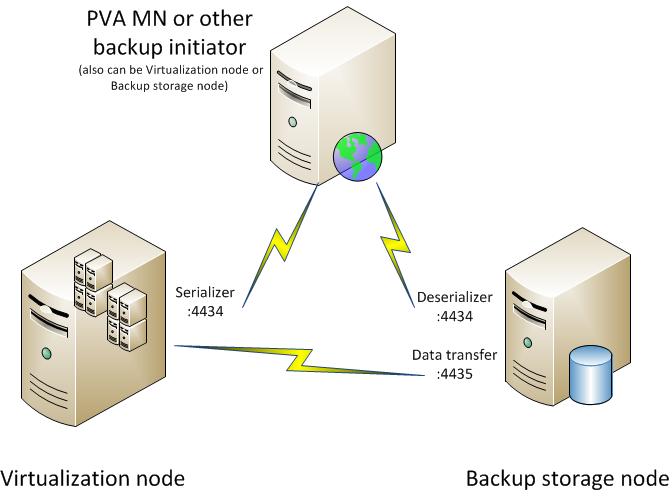
A single server can handle all three roles in the case of a local backup.
Backup scenarios
Scenario
Roles
Example
Local backup of mypvcserver
Virtualization node: mypvcserver
vzabackup -F mypvcserver -e CTID
Locally initiated backup to the remote storage
Virtualization node: myvpcserver
Backup storage node: remotestorage
Control node: myvpcserver
vzabackup --storage root@remotestorage localhost -e CTID
Backup initiated from the storage server
Virtualization node: myvpcserver
Backup storage node: remotestorage
Control node: myvpcserver
vzabackup -F mypvcserver
Backup of the server to remote storage initiated by the third server
Virtualization node: myvpcserver
Backup storage node: remotestorage
Control node: myvpcserver
vzabackup --storage root@remotestorage -F mypvcserver -e CTID
Backup tools and interfaces
- Graphical
-
VA Control Center - The web interface of VA MN, allowing you to manage backups for all Hardware Nodes in the VA group.
-
Power Panel - The web interface for managing a particular container. A backup initiated from the Power Panel is performed according to the local settings of the Hardware Node the container is hosted on.
-
Parallels Management Console (obsolete) - A graphical tool shipped with older versions of Virtuozzo containers. This allows you to perform backup and restore operations across registered nodes.
-
Command-line
-
vzabackup\vzarestore - CLI interface to VA Agent Backup API methods.
-
vzbackup\vzrestore (obsolete) - CLI interface to TAR-based backup. This does not require VA Agent to be running.
NOTE: On Virtuozzo containers for Windows, this is in the form of another wrapper on the vzabackup\vzarestore tool.
- API
- Backup interfaces of VA Management Node XML API.
- Backup interfaces of VA Agent via SOAP and XML API.
Backup backend
Virtuozzo provides two backends for backup files:
- One that is compatible with Acronis Backup and Restore (default)
- One that is compatible with TAR.
The backup engine backend can be switched in the VA Agent configuration file:
-
Edit the VA Agent configuration file:
/vz/pva/agent/etc/vzagent.conf
or
/var/opt/pva/agent/etc/vzagent.conf
-
Change the backend value to 0 for Acronis-compatible, or 1 for TAR-based:
-
vzlin_backup_serializer (for pre-VA 4.6.4 nodes):
<vzlin_backup_serializer>
<configuration>
<backend>1</backend>
<enable_snapshot>1</enable_snapshot>
<custom>
<queue>0</queue>
<heavy_timeout_limit>360000</heavy_timeout_limit>
</custom>
</configuration>
</vzlin_backup_serializer>
-
vzlin_backup_serializer11 (for VA 4.6.4 and later versions):
<vzlin_backup_serializer11>`
<configuration>
<backend>1</backend>
<enable_snapshot>1</enable_snapshot>
<custom>
<pool>0</pool>
<queue>0</queue>
<heavy_timeout_limit>360000</heavy_timeout_limit>
</custom>
</configuration>
</vzlin_backup_serializer11>
-
Restart VA Agent:
~# pvaagent restart
Additional information
How to increase VA Agent timeouts for backup operations
Acronis Error: Module=0 Code=0, Tag=0 troubleshooting
Virtual Automation builds, releases, and supported virtualization products
Internal content